There are different methods to send your genealogy file from an iOS mobile device to another device.
-
Transfer a genealogy file in Heredis format by USB cable
This method is used to send your genealogy in Heredis format to a Mac computer only that has the same or earlier version of Heredis as you do.
To display the instructions to send a Heredis file by USB cable, you can click on this line
Step 1 : Transfer the genealogy from the mobile device to the computer
Connect your mobile to your computer via its USB charging cable.
Open the Finder on your Mac and follow these steps :
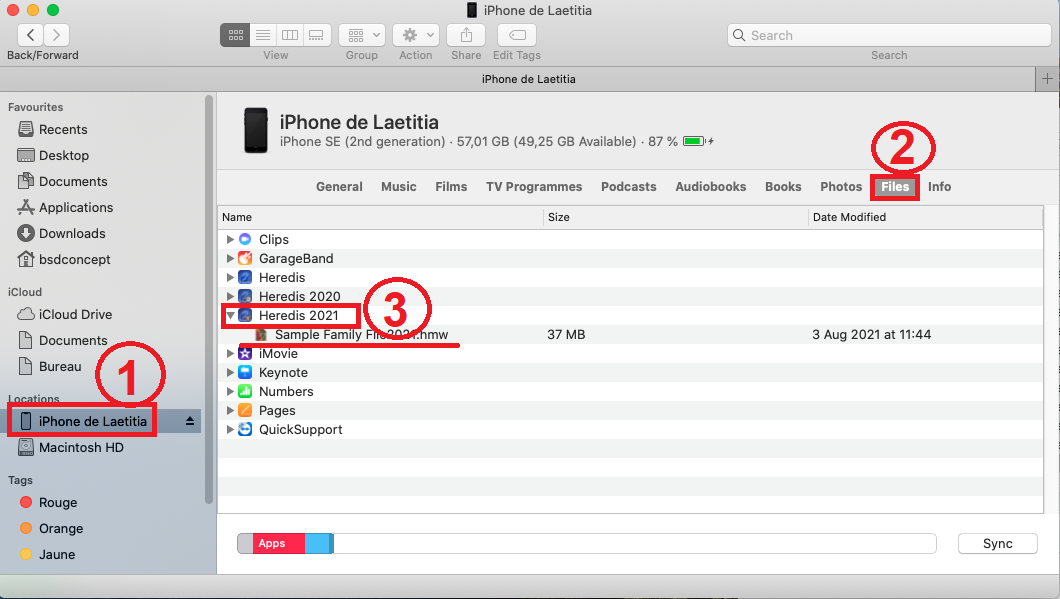
1 - In the left palette, select your mobile device.
2 - Click on Files
3 - Click on the arrow on the left of your version of Heredis to display the list of files attached to the mobile device. Select your file and drag and drop the file in your Finder to the location of your choice.
Once the copy is complete, eject the device from your Mac.
Step 2 : Open the genealogy on your computer
On your computer, launch the Heredis software and click on Open an existing file -> Heredis file -> Ok :
Select the file in your Finder.
The file will then open in the program.
-
Share on local network
Share on local network allows you to send your Heredis genealogy file via your Wifi network to a Windows or Mac computer or an Android or iOS mobile device that has the same version of Heredis as your computer.
This function is quite complex, so we provide you with a specific section that allows you to discover it in details. To consult it, click here : Click here